

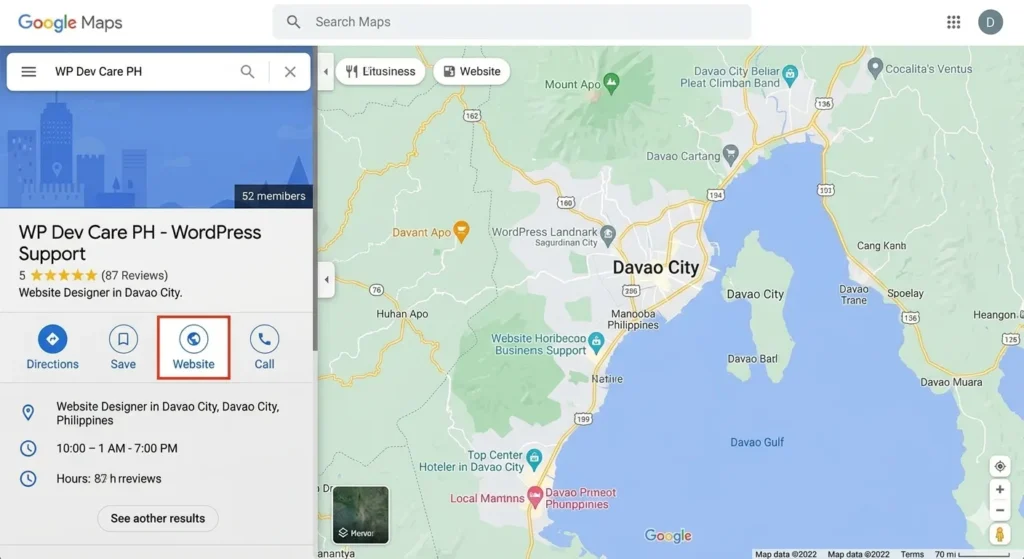
Google Business Profile Philippines is one of the most powerful free tools available to local business owners – and most are either not using it or using it incorrectly. If your business isn’t showing up when someone searches “web designer near me” or “restaurant Davao City” on Google Maps, a properly set up GBP listing is the fastest way to fix that.
This guide walks you through exactly how to set up and optimise your Google Business Profile Philippines listing in 2026.
What Is Google Business Profile Philippines?
Google Business Profile (formerly Google My Business) is a free tool from Google that lets businesses manage how they appear in Google Search and Google Maps. When someone searches for a business type near them, Google displays a map with nearby listings – those are GBP profiles.
For Philippine businesses, especially those serving local customers in cities like Davao, Cebu, or Manila, a well-optimised GBP listing can drive more calls and inquiries than a website alone.
Why Every Philippine Business Needs a GBP Listing
Here’s what a verified and optimised Google Business Profile Philippines listing gives you:
- Visibility on Google Maps when local customers search
- A direct link to your website, phone number, and address
- A platform for customer reviews that build trust
- Free posts to promote offers, updates, and announcements
- Insights showing how many people viewed and clicked your listing
Businesses with complete, active GBP profiles consistently outrank competitors in local search results. For a small business with a limited marketing budget, this is the highest-ROI free tool available.
How to Set Up Google Business Profile Philippines (Step by Step)
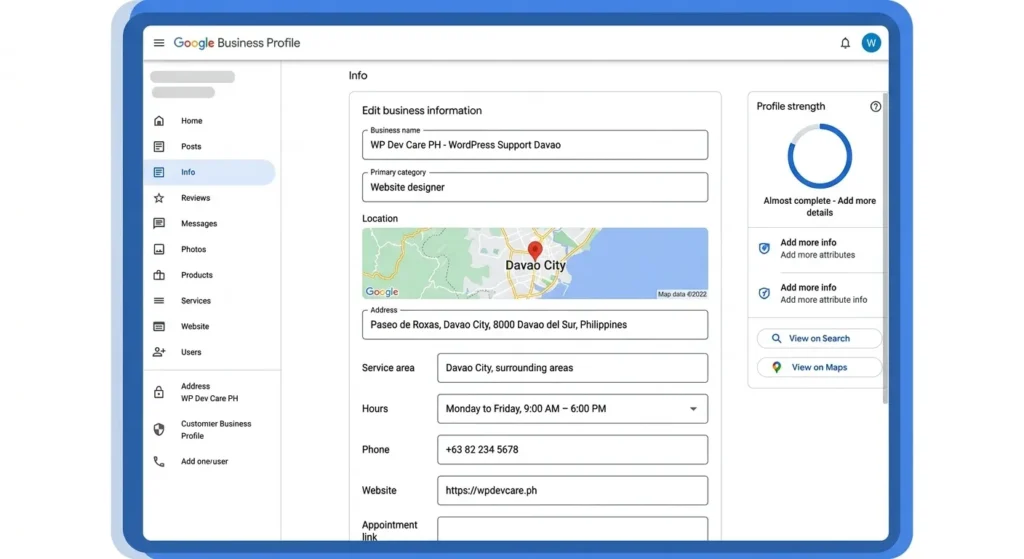
Step 1: Go to business.google.com
Visit Google Business Profile and sign in with your Google account. Use the same Google account you want associated with your business long-term.
Step 2: Enter your business name
Type your exact business name. If your business already appears in a dropdown, it may have been auto-generated by Google – click it and claim it rather than creating a duplicate.
Step 3: Choose your primary business category
This is one of the most important fields. Choose the category that best describes your core service. For example: “Web designer”, “Restaurant”, “Real estate agency”. You can add secondary categories later.
Step 4: Add your location
If you serve customers at a physical location, add your address. If you’re a service-area business (you go to clients), you can hide your address and list the areas you serve instead – such as Davao City, Davao del Sur, or the whole Mindanao region.
Step 5: Add your contact details
Enter your business phone number and website URL. Make sure these match exactly what appears on your website and other online listings for consistency.
Step 6: Verify your listing
Google requires verification to confirm you own the business. Options include postcard by mail, phone call, email, or instant verification if your website is already verified in Google Search Console. For most Philippine businesses, phone or email verification is fastest.
Once verified, your listing goes live on Google Search and Maps.
How to Optimise Your Google Business Profile Philippines Listing
Setting up is just the beginning. Optimisation is what makes your listing rank above competitors.
Add photos regularly
Businesses with photos receive significantly more clicks than those without. Add your logo, a cover photo, interior or exterior shots, product or service images, and team photos. Aim for at least 10 photos to start.
Collect reviews consistently
Reviews are the single biggest factor in local ranking and customer trust. After every completed job or sale, send your client a direct review link via WhatsApp or email. Aim for 10+ reviews with an average of 4.5 stars or higher. Always respond to every review – positive or negative.
Complete every field
Fill in your business hours, services offered, business description (use your keywords naturally), and website URL. An incomplete profile ranks lower than a complete one.
Post updates weekly
GBP allows you to publish posts similar to social media – promotions, new services, blog articles, announcements. Posting weekly signals to Google that your business is active, which helps your ranking.
Add your services
Under the Services section, list every specific service you offer with a short description and price if applicable. This helps Google match your listing to more specific search queries.
Common Mistakes Filipino Business Owners Make on Google Business Profile
Using an inconsistent business name – Your business name on GBP should match your website, Facebook page, and other directories exactly. Inconsistencies confuse Google and hurt your local ranking.
Choosing the wrong primary category – Many businesses pick a generic category like “Business” or “Company” instead of a specific one. Be as specific as possible.
Never asking for reviews – Happy customers rarely leave reviews unless asked directly. Build review requests into your standard workflow after every job.
Ignoring the listing after setup – A dormant GBP listing slowly loses ranking. Log in at least once a week to post an update, respond to reviews, or add a new photo.
Not adding a website link – Your GBP listing should always link to your website. This drives traffic and signals legitimacy to Google.
Need Help with Local SEO Philippines?
Setting up your Google Business Profile Philippines listing is a great first step – but it’s just one part of a complete local SEO strategy. To consistently rank above competitors in your city, you need an optimised website, consistent directory listings, regular review generation, and ongoing content.
At WP Dev Care PH, our local SEO services Philippines are built specifically for Philippine small businesses that want to rank higher on Google and Google Maps without spending on paid ads. We also offer web design services Philippines that are built with local SEO in mind from the ground up.
Get in touch to find out how we can help your business get found online.